Reverse Engineering HydroHome App
June 2025
Keytool to generate a keystore for signing the APK. Included as part of OpenJDK:
keytool -genkey -v -keystore my-release-key.keystore -alias alias_name -keyalg RSA -keysize 2048 -validity 10000
Building the APK:
apktool b split_config.arm64_v8a
adb install-multiple base/dist/base.apk split_config.arm64_v8a/dist/split_config.arm64_v8a.apk split_config.en.apk split_config.xxhdpi.apk
apksigner sign --ks ../my-release-key.keystore split_config.arm64_v8a/dist/split_config.arm64_v8a.apk
If you run out of memory when building using apktool b:
export _JAVA_OPTIONS="-Xmx8G"
I was doing a Zigbee capture of the surrounding environment for fun using the NRF52840dk when I noticed a bunch of Zigbee traffic coming from Itron smart meters on default channel 11.
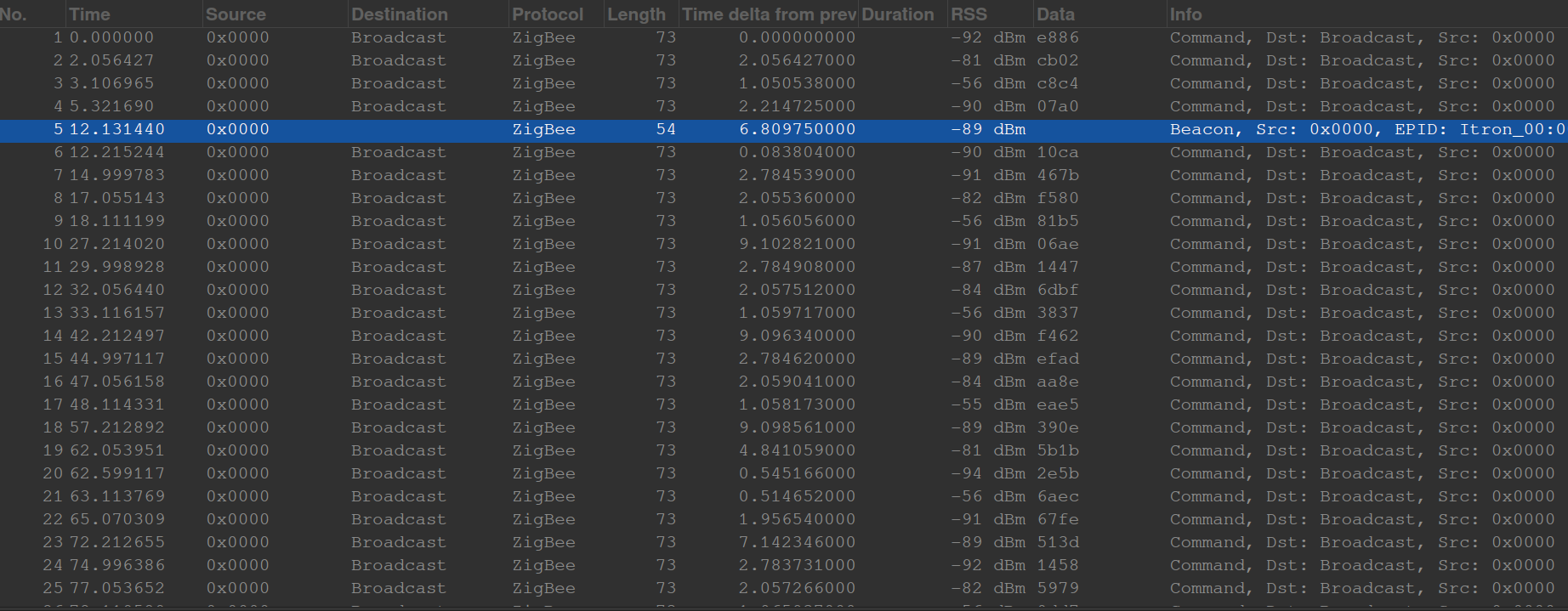
I went up to my smart meter, but I didn’t capture anything. The RSSI of the packets captured were around -90, so it was coming from the neighbours. I checked out my utilities website and found out they had Zigbee monitoring. Reading the datasheets of these Itron meters, there is the RFLAN, which is the FHSS 900MHz communication between the smart meter and the collector(RFWAN). Then there is a smart home network based on Zigbee 2.4Ghz for homeowners. Looking at the packet capture, the data was always 2 bytes, 15 second intervals. The payload is encrypted, but I can speculate it is either the current KWh reading on the meter, or a heartbeat keepalive. Whats also interesting is the destination is broadcast, so not sure why that is. I thought it would be unicast to the receiver units for each customer, but I guess not.
Further reading the documentation, the customer must opt in for Zigbee broadcasts. So this must mean a lot of my neighbours actually have this feature enabled. They opted into the HydroHome app. You also need to buy a seperate collector unit for 75 or 165 dollars. The latter having more smart home features. I will waste 75 dollars and get the device, then do a detailed packet capture to see exactly what happens. I do want to try to pair this with my home assistant box, so I can get power readings directly into Homeassistant. The app also communicates with a third party server, which sucks. If its local, KEEP IT LOCAL FFS, why contract it out…
Anyway, I was looking at the Android APK so I immediately took out my rooted phone with TLS interception enabled at the system level using PCAPDroid. Launching the app gave me an error message. Looking at logs in PCAPDroid, the TLS handshake failed. I knew this app was using Cert pinning, so I need to bypass it. Whats really annoying about this app is it uses split apks, in this case 4 seperate apk files. The base.apk contains bytecode, then config.apk files that store libraries, images, text, json files etc. First I used adb to pull the apks directly to my laptop. List the files:
$ adb shell pm path com.powerley.hydrohome
package:/data/app/com.powerley.hydrohome-BxyFa-sAgLyJInrg4GZSXQ==/base.apk
package:/data/app/com.powerley.hydrohome-BxyFa-sAgLyJInrg4GZSXQ==/split_config.arm64_v8a.apk
package:/data/app/com.powerley.hydrohome-BxyFa-sAgLyJInrg4GZSXQ==/split_config.en.apk
package:/data/app/com.powerley.hydrohome-BxyFa-sAgLyJInrg4GZSXQ==/split_config.xxhdpi.apk
Then pull each one using: adb pull /data/app/com.powerley.hydrohome-BxyFa-sAgLyJInrg4GZSXQ==/base.apk /path/on/local/machine
Once this was done, I extracted the base.apk and used grep -r "certificate" *" to look for any interesting files. I immediately saw files names that caught my attention: certificatePinner.smali. Looking at the smali code, I tried to patch out the 3 check functions so it immediately returns using return-void. I built the apk using the 3 commands at the top of this page. Make a keystore if you havent. Remember Android apps must be signed in order to install. It doesn’t need to be trusted just signed with anything. So we first build using apktool, then sign using apksigner and passing the keystore we made earlier. Yes I know I should use zipalign before signing the apk, but too lazy ok, it works. Good enough for testing. I spend the next 3 hours patching out different functions. What was interesting was all the TLS code from Huawei. Interesting… Anyway that didn’t work. Then I decided to look further into the other apk files. This is when I noticed a config.json file under a flutter path. I immediately knew that this app was made in Flutter, which meant it ran in a VM using Dart. AAAAAAAAAAAAA!
So I wasted 3 hours of my life great.. I need to find the .so files for the Flutter libraries and patch them since all the TLS stuff was in the library file and not in bytecode. Kill me… Now the lib files are in the split_config.arm64_v8a.apk file. So using Apktool on that gave me the relevant libflutter.so and libapp.so files. In order to bypass certificate pinning, we need to patch the libflutter.so library and always return true. I opened the file in Ghidra and wait for it to finish analyzing. This took around 10 minutes, CPU 100% lol.
Flutter apps use BoringSSL for TLS, encryption, all that stuff. I need to find the ssl_crypto_x509_session_verify_cert_chain function in this file.
static bool ssl_crypto_x509_session_verify_cert_chain(SSL_SESSION *session,
                                                      SSL_HANDSHAKE *hs,
                                                      uint8_t *out_alert) {
  *out_alert = SSL_AD_INTERNAL_ERROR;
  STACK_OF(X509) *const cert_chain = session->x509_chain;
  if (cert_chain == nullptr || sk_X509_num(cert_chain) == 0) {
    return false;
  }

  SSL *const ssl = hs->ssl;
  SSL_CTX *ssl_ctx = ssl->ctx.get();
  X509_STORE *verify_store = ssl_ctx->cert_store;
  if (hs->config->cert->verify_store != nullptr) {
    verify_store = hs->config->cert->verify_store;
  }

  X509 *leaf = sk_X509_value(cert_chain, 0);
  const char *name;
  size_t name_len;
  SSL_get0_ech_name_override(ssl, &name, &name_len);
  UniquePtr<X509_STORE_CTX> ctx(X509_STORE_CTX_new());
  if (!ctx ||
      !X509_STORE_CTX_init(ctx.get(), verify_store, leaf, cert_chain) ||
      !X509_STORE_CTX_set_ex_data(ctx.get(),
                                  SSL_get_ex_data_X509_STORE_CTX_idx(), ssl) ||
      // We need to inherit the verify parameters. These can be determined by
      // the context: if its a server it will verify SSL client certificates or
      // vice versa.
      !X509_STORE_CTX_set_default(ctx.get(),
                                  ssl->server ? "ssl_client" : "ssl_server") ||
      // Anything non-default in "param" should overwrite anything in the ctx.
      !X509_VERIFY_PARAM_set1(X509_STORE_CTX_get0_param(ctx.get()),
                              hs->config->param) ||
      // ClientHelloOuter connections use a different name.
      (name_len != 0 &&
       !X509_VERIFY_PARAM_set1_host(X509_STORE_CTX_get0_param(ctx.get()), name,
                                    name_len))) {
    OPENSSL_PUT_ERROR(SSL, ERR_R_X509_LIB);
    return false;
  }
Launch browser with SSLKEYLOGFILE to export TLS secrets: SSLKEYLOGFILE="/tmp/keys.txt" firefox. When using PCAPDroid, make sure to NOT Capture as root. For some reason, the SSLKEYLOGFILE generated doesn’t work properly when loaded into Wireshark. Back in Ghidra search for specific scalar 361, line number for OPENSSL_PUT_ERROR(SSL, ERR_R_X509_LIB); function call. Then in the decompiler, match it with the source code. For v1.0.30 (1147) of Hydrohome, this function is at address 007e8764. Patch the library file by skipping over all checks and returning true every single time, replace original with modded file, and rebuild with Apktool.
Combine PCAP with SSLKEYLOGFILE: editcap --inject-secrets tls,keys.txt in.pcap out-dsb.pcapng. Yes that is a comma delimeter between tls and keys.txt. For easy remote control, I enabled remote ADB and used scrcpy to easily control my Android test phone from anywhere. The issue I have with the HydroHome app is it is stuck on a loading screen forever and does not progress. You accept the terms and conditions on first use, but after the screen just loads forever. Checked the packet capture and nothing is gone wrong there. Tried on my non rooted Pixel, same thing. I will get in contact with HydroHome support to see what they can do.
2025-09-04
Hydrohome support is useless lol. Still havent solved the problem. The API data returned for my account is wrong.
2025-12-17
Looks like Hydrohome v1.0.41(1980) patched to newer version of BoringSSL. Release February 3, 2025, commit ID 33d1049. Scalar is now 238 for the ssl_crypto_x509_session_verify_cert_chain function. The fn is currently at address: 0083efe8 mov w3,#0xee 0xee 0xee FUN_0083ee80
Beginning contents:
void FUN_0083ee80(long param_1,long *param_2,undefined1 *param_3)

{
  char *pcVar1;
  int iVar2;
  int iVar3;
  long lVar4;
  undefined1 uVar5;
  long extraout_x8;
  long lVar6;
  long extraout_x8_00;
  ulong uVar7;
  undefined8 *extraout_x9;
  undefined8 *extraout_x9_00;
  undefined8 *puVar8;
  long lVar9;
  long lVar10;
  long extraout_x13;
  undefined4 uVar11;
  long unaff_x20;
  long unaff_x21;
  long lVar12;
  long *plVar13;
  undefined8 uVar14;
  long lVar15;
  long local_68;

  *param_3 = 0x50;
  plVar13 = *(long **)(param_1 + 0xa0);
  if ((plVar13 == (long *)0x0) || (*plVar13 == 0)) {
    uVar11 = 0;
    goto LAB_0083effc;
  }
2026-02-12
More updates and more decompilation. Still Scalar 238, no change in this latest revision code 2228. Just patch it and continue TLS decryption. At address 0083ee80. Patch:
        0083ee9c 34 00 80 52     mov        w20,#0x1
        0083eea0 48 00 00 39     strb       w8,[x2]
        0083eea4 56 00 00 14     b          LAB_0083effc
LAB_0083effc is the return handler. Change to w20,#0x1. We set the return value to w20 here to true. Export the original binary, apktool, sign, then adb install.