Local LLMs, Inference, Quantization
June 2025
AMD
F the Nvidia Monopoly. Lets see how AMD performs when it comes to LLMs. I bought a RX 7900XTX for 850 CAD on eBay. Stress tested it last night for 3 hours using Furmark, Heavens, and OCCT. No problems. GPU is super cool, but the memory gets up to 97 Celcius. Not great, but oh well GDDR6X runs hot. ROCm is the AMD equivalent to Nvidia’s Compute Unified Device Architecture(CUDA). And yes ROCm doesn’t stand for anything right now because aparently the name was trademarked or something. Before you start, install the AMD GPU driver and ROCM. Instructions on on their website.
On Debian 12 baremetal:
Compiling llama.cpp with ROCm support: HIPCXX="$(hipconfig -l)/clang" HIP_PATH="$(hipconfig -R)" cmake -S . -B build -DGGML_HIP=ON -DGGML_HIP_ROCWMMA_FATTN=ON -DAMDGPU_TARGETS=gfx1100 -DCMAKE_BUILD_TYPE=Release && cmake --build build --config Release -- -j 16
Install Python venv: sudo apt install python3-venv. Make new Python venv: python3 -m venv directory_name into new directory. Activate using source directory_name/bin/active.
My system has 16GB of system RAM and 24GB of GPU VRAM. This is a problem for llama.cpp because it first loads the model into system RAM, then onto VRAM. So I can only load 16-17GB into VRAM before out of memory. I can’t even use all the VRAM on the 7900XTX!!! So lets try Exllama to see if we can load the model in chunks directly into the GPU.
Easy way to find out ROCM version:
$ apt show rocm-libs

Package: rocm-libs
Version: 6.4.1.60401-83~22.04
In your venv:
pip install torch torchvision torchaudio --index-url https://download.pytorch.org/whl/nightly/rocm6.4/git clone https://github.com/turboderp/exllama && cd exllama && pip install -r requirements.txt
To download a repo from HuggingFace, we can use git. First install git-lfs: sudo apt install git-lfs, then git clone as usual.
export PYTORCH_ROCM_ARCH="gfx1100", build for 7900XTX. Find your target GPU here.
Lets install multiple versions of ROCM. For ExllamaV2, use v6.1. Follow these docs.
Because Debian 12 doesn’t have Python3.10 or Python3.8 installed and you can’t install it via apt, you must mod the rocm-gdb6.1.0.deb file. Credit goes to Joe Landman
cd /var/cache/apt/archivesdpkg-deb -x rocm_gdb_installer.deb rocm-gdbdpkg-deb --control rocm_gdb_installer.deb rocm-gdb/DEBIANsed -i.bak 's/libpython3.10/libpython3.11 \| libpython3.10/g' rocm-gdb/DEBIAN/controlln -s /usr/lib/python3.11/config-3.11-x86_64-linux-gnu/libpython3.11.so /usr/lib/x86_64-linux-gnu/libpython3.10.soldconfigdpkg -b rocm-gdb rocm_gdb_installer_patched.debdpkg -i rocm_gdb_installer_patched.deb
sudo systemctl set-default multi-user.target Disable the GUI because it uses precious VRAM. I went form 123MB down to 40MB by disabling GUI and…. Holy crap I was able to run a Qwen 30B Q4 model, around 20t/s. Very useable. Using 24GB of vram with zero headroom lol. This is why you run headless machines to save that vram or use onboard graphics, which my system unfortunately doesn’t have.
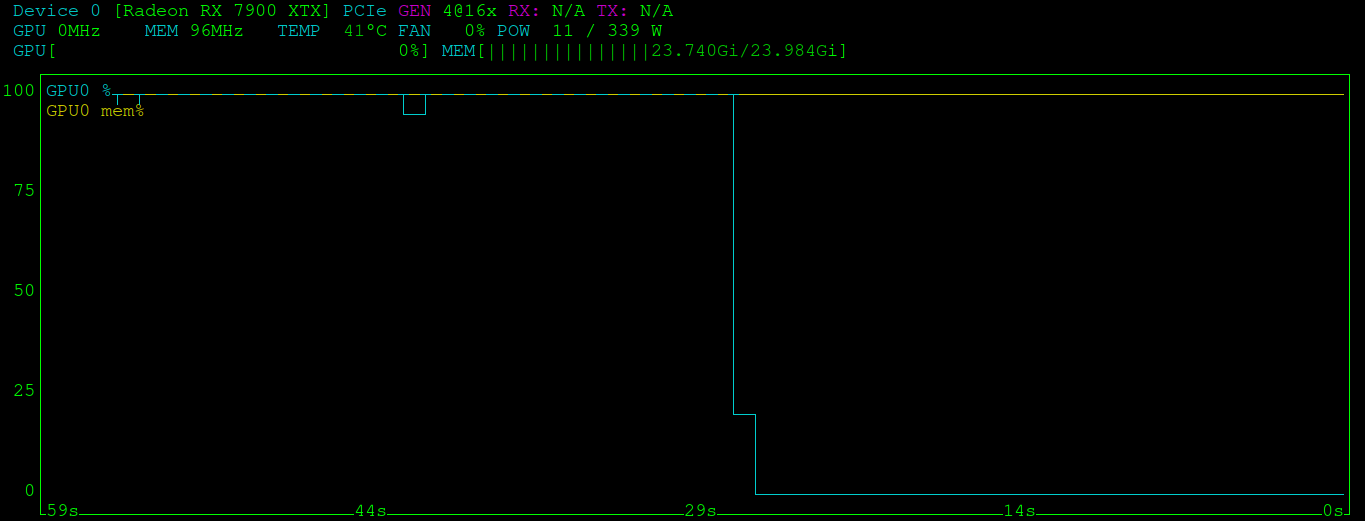
Of course this is a MoE model, so I expect much faster inference. Only 3.3B parameters are activated on inference. Next, I want to try quantizing my own models. So I can run a 70B model using 24GB of vram, probably need to use 3bit quant or something. Lets get started.
If you get ValueError: Memoryview is too large error when installing torch using pip append: --no-cache-dir.
Install Flash attention using ROCM: FLASH_ATTENTION_TRITON_AMD_ENABLE="TRUE" MAX_JOBS=5 pip3 install flash-attn --no-build-isolation
FLASH_ATTENTION_TRITON_AMD_ENABLE=TRUE python wgp.py when running WGP for text-video.
NVIDIA
Install the CUDA toolkit and Nvidia drivers. Using Debian 12:
wget https://developer.download.nvidia.com/compute/cuda/repos/debian12/x86_64/cuda-keyring_1.1-1_all.debsudo dpkg -i cuda-keyring_1.1-1_all.debsudo apt updatesudo apt install cuda-toolkitsudo apt install nvidia-driver-cuda nvidia-kernel-dkms- Blacklist nouveau by making new config file in the
/etc/modprobe.ddirectory sudo initramfs -usudo reboot
modprobe file should contain:
blacklist nouveau
options nouveau modeset=0
This might be optional as Nvidia drivers installs a nvidia.conf file with blacklist, but put it in anyway just in case.
I am using a 4090D 48GB. I think its a driver issue or limitation. The fan speed will never go below 30%. You can try setting it, but it won’t let you. Make sure to start X server if running in headless environment as root first: sudo X, export the following 2 env variables:
export DISPLAY=:0
export XAUTHORITY=/var/run/lightdm/root/:0
Using nvidia-settings:
sudo nvidia-settings -a "[gpu:1]/GPUFanControlState=0"
This sets the fan to auto controlled by GPU. In theory this will allow the fan to go below 30%. My GPU fan remains at 30% even though temps are at 28 celcius. Oh well.
To set the fan to specified percentage:
sudo nvidia-settings -a "[gpu:0]/GPUFanControlState=1" -a "[fan:0]/GPUTargetFanSpeed=<30-100%>"
Must have GPUFanControlState=1, this switches from auto to user fan control mode. Another thing that is interesting is even at idle, with no desktop environment, GPU is using 0.636Gi of VRAM. Much more than AMD.
Made a script in /usr/local/bin to automatically start X server, set fan speed, them kill X.
#!/bin/bash

if [ $EUID -ne 0 ]
then
   echo "This script must be run as root"
   exit 1
fi

read -p "Input fan speed: 30-100 or enter for auto" fanspeed

X &
export DISPLAY=:0
export XAUTHORITY=/var/run/lightdm/root/:0
if [ $fanspeed -ge 30 ]
then
        nvidia-settings -a "[gpu:0]/GPUFanControlState=1" -a "[fan:0]/GPUTargetFanSpeed=$fanspeed"
else
        nvidia-settings -a "[gpu:0]/GPUFanControlState=0"
fi
kill $(pgrep X)
To find out CUDA version execute: /usr/local/cuda-12/bin/nvcc --version
When compiling flash attention with limited system RAM. Make sure to install ninja using pip3 install ninja in your venv. set FLASH_ATTN_CUDA_ARCHS=128 to only build flash attention for your current CUDA version. If you look in setup.py the CUDA archs env variable by default installs 4 different versions I believe. Execute the build using pip via MAX_JOBS=5 pip3 install flash-attn --no-build-isolation
Your MAX_JOBS variable depends on how much system RAM you have. I have 16GB+16GB swap. The first build process takes the most memory. I got up to 26GB total before it settled down. I could probably increase to 6, but wanted to play it safe. YMMV. Now you just wait and monitor with htop.