Running Tor relays and proxy servers to bypass censorship
We are very lucky in North America to have free access to the internet. There isn’t censorship like what is happening in Russia, China, Turkmenistan, Iran, etc. I run several proxy servers and Tor relays to help out the community because I believe in internet freedom for all. Of course I won’t go into lots of detail on exactly what I do since this information can be used against us by government censors, instead I will provide best practices to running effective relay services for public use.
Do your own research and consider all risks
The first step is to pick a server that is outside of the censored region for obvious reasons, bonus points if you can pay using privacy coins like XMR. Another thing to look for is network diversity. Any anonymity network like TOR, Lokinet, I2P will benefit from a diverse range of Autonomous Systems(AS) or Internet Service Providers(ISPs) in countries all around the world. If you go to TOR metrics, you can see the relay distribution by country and ASNs. You should try to run a relay in a smaller ASN and avoid countries like Germany, Netherlands, and the US if you can. As of 2024/12/25, there are 7933 relays and out of those relays, 2189 are exit relays. When you connect to the TOR network, your traffic goes through 3 nodes. You can read more about how TOR works here
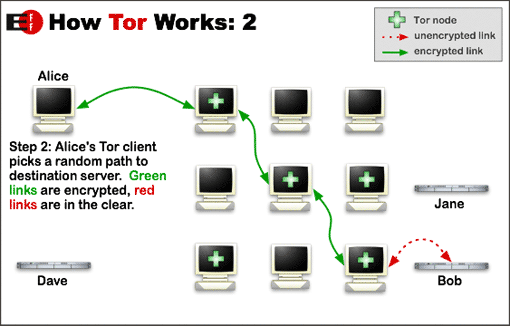
Tor entry and middle relays only see traffic from incoming clients and other relays, these are the safest to run since they don’t exit any traffic to the internet. If you have a spare computer at home and want to contribute to TOR, this is the relay you should run. However, you should be aware of risks even running a entry or middle relay. First, your router must be able to handle thousands of open connections. You must throw your ISP trash into the garbage and invest into a better edge router to handle these. In my experience, a TOR entry node will get around 7000 concurrent connections at once. A cheap router will not have the RAM available and will crash, can’t store anymore entries in NAT table. It is also a good practice to get a 2nd dedicated IPv4 and IPv6 address for TOR relay only from your ISP. If you are paying for a dedicated FTTH(Fiber to the home) line, you should be able to get at least 2 IP addresses and many ISPs now support prefix delegation for IPv6. You can get a /56 from the ISP and allocate an entire /64 to your relay if you want. Also make sure your ISP doesn’t do CGNAT and you can port forward on your router. Go to your router admin portal and check the WAN address. Make sure it isn’t in the range: 100.64.x.x through 100.127.x.x
Why are we doing all this? Some websites are stupid, especially banking and government websites. They will block your residential IP address if you run a TOR relay. You should be aware that all relay IPs are public and can be scrapped using the Onionoo API. I wrote this script in Python to demonstrate this:
import requests
import re

r = requests.get("https://onionoo.torproject.org/details?search=flag:valid")

for relay in r.json()['relays']:
        for ip in relay['or_addresses']:
                ipv4 = re.match(r'(\d+\.\d+\.\d+\.\d+)', ip)
                if ipv4: print(ipv4.group(1))
                #ipv6 = re.match(r'\[(.*?)\]', ip)
                #if ipv6: print(ipv6.group(1))
Using the script, IPv4 and IPv6 of ALL TOR relays can be extracted. Some websites will simply use this script and block all TOR nodes, so if you run a relay using the same IP for production use, you will notice that some websites will start to block you. This is why I recommend using a dedicated IPv4 + IPv6 address for relays. Recently, TOR relays have been victims of IP spoofing attacks. IP spoofing has always been a threat, its used for DDoS attacks and thats why BCP38 exists. Ingress filtering at the edge routers of AS can mitigate this attack. The router will only forward packets if the source IP is within its allocated range, otherwise its dropped. Unfortunately, some ISPs don’t implement this and once the packets leave the AS, its “impossible” to detect if it was spoofed or not. What I am trying to say here is your IP is now on a public list that anyone can scrape. Bots will try to compromise your relay device, this is why it is crucial to harden the device and preferably completely airgap it from your production network. You should be aware of all network listening services on the relay device, disable password authentication for SSH, and enable unattended-upgrades. Do a network scan yourself from the outside using nmap, see what services are visible and keep it to only the ORPort exposed. By default, TOR runs as a regular user _tor, but you can harden this even further by running a Podman container in a dedicated userspace.
AVOID EXIT NODES UNLESS YOU KNOW WHAT YOU ARE DOING!!!!
Exit nodes are an entirely different story. You are reaching out to the world wide web and fetching data for TOR users. You don’t know who is accessing the service since you can only see the middle relay. Now there are timing attacks that a global passive adversary can pull off, however lets assume you don’t have that capability. Because TOR hides the original users IP address, this promotes malicious activity. People and most likely bots will perform web attacks, brute force attacks, and DDoS from your TOR Exit. The end server will see your exit IP address, so they think its you, but in reality its not your traffic. People have been raided by the police for running an exit relay from their own home, JUST DON’T DO IT. Tor Project does not recommend this at all. If you don’t believe me, check out all the abuse reports for a TOR exit here. As of 2024/12/25, it has been reported 16,452 times for malicious traffic. Most common attacks nowadays is web app, SQL injection, and brute force attacks. Your ISP is going to shut your internet off, most likely get raided, and you get into legal trouble. Its not worth it, just run a exit relay from a good VPS provider.
Unfortunately, this risk really limits network diversity. I don’t think a single exit relay is run in a residential network, they are all in datacenters. This is really bad since it centralizes the network, making timing attacks much easier for global threat actors. Of course, the relay operator can inspect outgoing network traffic and perform IPS to reduce malicious traffic, but once again there is a legal issue since you are looking at potentially sensitive information if its not encrypted. Another issue with this approach is most malicious traffic today is going to be encrypted, so you must break TLS by doing a MITM. This is obviously against Tor Project guidelines and you will get kicked from the network if you do this. The best way to reduce malicious traffic right now is limiting your exit policy and bandwidth. If you are really concerned with abuse, only allow port 443 and set a bandwidth limit. TCP port 443 is most commonly used for TLS web traffic, so you will be helping out TOR Browser users. It doesn’t get abused as much, but web attacks will always be present. The bandwidth limit will not get your relay promoted as much, so it won’t attract as much traffic from potentially malicious sources. Once again, this is security through obscurity, not a good practice, but the best you can do.
You should also be running your own recursive DNS resolver with DNSSEC enabled if you run an exit. Clients will use your DNS for name resolution, so it must not be censored by an upstream provider. Remember plaintext DNS has no authentication, so you can easily spoof the contents and the client will not know any better. DNSSEC will protect against any tampering done by any upstream ISPs. Honestly, if your ISP censores DNS, it might not be a good provider to run a TOR exit relay.
Bypassing QoS using a Proxy
Some ISPs will throttle your bandwidth using deep packet inspection(DPI). Instead of looking at only layer 3 headers, DPI looks at everything, including layer 7 if not encrypted. We know that the majority of internet traffic is encrypted, however every single encrypted protocol has its unique signature. Think about it. How does Wireshark know the traffic is HTTP, TLS, or OpenVPN? It has signature detection. ISPs can use this knowledge to whitelist and blacklist traffic. The goal is to make internet traffic look like a protocol that is whitelisted, so you can achieve maximum speeds.
Welp Tor exit got shutdown by hosting provider
Bots(most likely) were sending a bunch of TCP SYNs over port 80 and 443 to a Hetzner ip range. Hetzner auto reported this to the abuse team at the ISP and they subsequently shutdown my VPS because it violated the TOS. Well this is what you will risk if running a Exit relay. Dos attacks like this are super common and they represent a small fraction of the actual traffic passing my relay. For almost 2 years, my exit relay was running with zero issue. This happened right after my relay got promoted and the consensus weight increased. So maybe I could have prevented this by setting a bandwidth limit. Unfortunately stuff like this makes Tor look very malicious. Tor gets a bad rep because of stupid bots automating these attacks and it really reduces the credibility of the network. This really shows how its human nature to focus only on the bad and ignore the good. Don’t worry I haven’t given up completely. I still run bridges and guard/middle nodes to support the TOR network. Bridges get lots of connections from Russia and China and over 30GB of traffic every day, so im happy with that.